
Learn how to create the trendy Rap Hotel Lobby now: Step by Step
Learn how to create the trendy Rap Hotel Lobby now: Step by Step, and also discover how to dominate social media with this amazing viral video.
Join the Rap Hotel Lobby trend
Create VideoIn fact, you've probably already seen several famous personalities rapping in that minimalist orange studio while scrolling through your TikTok feed.
However, creating this incredible effect seems very difficult at first glance, especially if you don't understand anything about video editing.
That's why I've prepared this super complete guide to help you recreate this fantastic scene in just a few minutes in a simple way.
The Phenomenon Behind Studio Orange
I confess that I became completely addicted to this trend as soon as it first appeared on my feed.
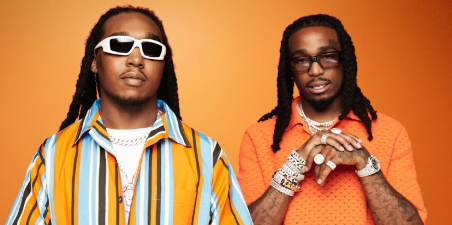
For those who don't know, it's all based on a 2022 presentation from the famous channel "A Colors Show," known worldwide for its minimalist, single-color studios.
In that particular video, rappers Quavo and Takeoff, who formed the duo Unc & Phew, sing the addictive song "Hotel Lobby" in a stoned orange setting.
The great thing is that the music, produced by the renowned Murda Beatz, has that super-defined 808 beat that works perfectly in short videos.
Consequently, people began using advanced artificial intelligence tools to swap the faces and bodies of the original rappers with other iconic figures.
Thus, the result retains the orange setting, the impeccable lighting, the original head movements and hand gestures, but with hilarious new protagonists.
Furthermore, this trend has incredible power because it always goes viral again from time to time.
In fact, it had already resurfaced strongly in 2025 and has now exploded again on the most popular social media platforms of the moment.
So, if you think you missed the timing, you can rest assured because there's still plenty of time to create your own content and accumulate thousands of views.
The Best Tools for Creating the Video
Currently, there are two main ways to create this amazing content: using apps with ready-made templates or AI-powered video generators.
If you prefer convenience, I highly recommend using dedicated apps that do almost all the hard work for you.
To make your choice easier, I tested the most popular options on the market and organized the details in the table below.
This way, you can decide which tool best suits your budget and your content creation style.
Application Ease of Use Generation Time Average Cost Standard Very High 2 to 3 minutes Paid (Credits) LightX High 3 to 5 minutes Free/Premium Seedance 2.5 Average 5 to 10 minutes Subscription
Certainly, each of these options has its unique advantages. For example, if you're looking for absolute speed, the Starrd is unbeatable because it delivers the model perfectly configured.
On the other hand, if you like to experiment before investing any money, LightX can be an excellent alternative to start your initial tests.
How to Make a Video Step by Step
Now that you're familiar with the tools, let's get straight to the point. I've prepared a simple guide so you can complete the process without any headaches.
If you want to save time, the Starrd app is the best option to put the "Learn how to do the Rap Hotel Lobby train now: Step by Step" guide into practice in an automated way.
First of all, you will need to download the application of your choice. You can easily find these tools on Google Play for Android devices or on the App Store if you use an iPhone.
After installing, simply follow the instructions below to generate your video:
Create your account: Open your chosen app and complete a quick registration using your email or social media account.
Search for the template: Type “Hotel Lobby” in the AI template search bar.
Choose the photos: Select two clear photos of the people or characters you want to include in the video.
Adjust the positions: Position each photo in the corresponding space indicated by the app to ensure a perfect face swap.
Generate the video: Click the render button and wait a few minutes while the artificial intelligence works its magic.
Immediately after processing is complete, the app will make the video available for download in vertical format, which is ideal for posting on Reels or TikTok.
I recommend you watch the final result carefully to check if the faces are well aligned with the rappers' body movements.
Extra Tips to Make Your Post Go Viral
In fact, simply creating the video doesn't guarantee that it will reach thousands of people on social media.
Therefore, I've outlined some strategies that I personally use to significantly increase engagement on my posts.
Choose unusual characters: Videos featuring political figures, famous superheroes, or even your own pets tend to attract much more attention from the public.
Use the official soundtrack: Always add the original audio directly from the social media platform's library where you're posting, as this helps the algorithm deliver your video to those already consuming the trend.
Create an eye-catching caption: Ask your followers questions or use fun phrases that encourage people to comment on your post.