How to recreate the 80s trend: Learn now!
How to recreate the 80s trend: Learn now how to transform your regular photos into amazing vintage portraits using only your cell phone.
I was tired of seeing everyone posting those nostalgic American yearbooks without knowing how to jump on the bandwagon.
That's why I decided to test the best apps and discovered the perfect secret to realistically recreating that retro aesthetic.
You'll be amazed at how easy it is to travel through time with just a few quick clicks on the screen.
Why has this retro wave taken over the internet?
I've always been fascinated by the colorful and personality-filled aesthetic of the golden age of pop music.
Furthermore , social media was flooded with photos featuring voluminous hair and classic, stylish denim jackets.
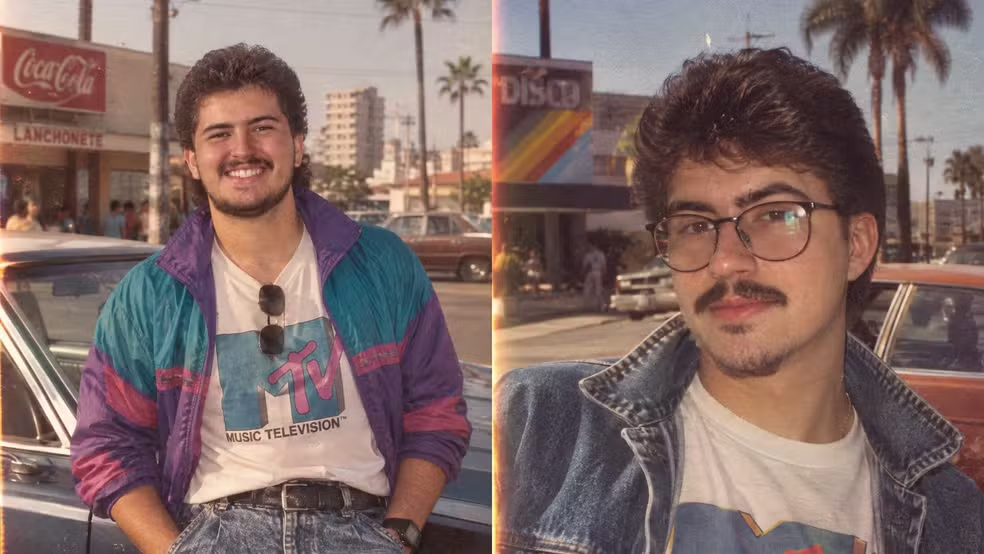
Many people still think they need complex editing programs to achieve this visual effect.
The ideal app for your virtual transformation.
To make your life easier, I tested the perfect tool called "How to do the 80s trend: Learn now".
In fact , this artificial intelligence application does all the hard work of editing for you in just a few seconds.
You just need to download the tool from Google Play to begin your journey.
No prior image editing experience is necessary to achieve simply professional results.
Simple step-by-step guide to creating your photos.
First , choose a photo of yourself that has good lighting and clearly shows your face from the front.
Open the app and select the specific 1980s filter from the style gallery.
Next , adjust the final details such as the analog grain and the vibrant colors typical of that wonderful era.
Extra tips for a perfect result
The lighting in the original photo greatly influences the realism of the final result generated by artificial intelligence.
Friendly tip: photos taken in daylight usually yield the best vintage results.
Try using photos with a neutral background so that the app can cut out and apply the effect perfectly.
It's also worth trying out different facial expressions to find the yearbook look that suits you best.
Where to download the app safely
You can find the official app directly in your device's App Store .
This way , you ensure a safe and virus-free download so you can start playing with your photos now.
Your friends will be impressed by the retro quality and incredible realism of your new posts.
Comparison of Nostalgic Styles
I've prepared a quick table for you to understand the main differences between the most popular visual trends right now.
Style | Main Focus | Difficulty | 80s | Voluminous hair and neon colors | Very Easy | 90s | Grunge style and analog photos | Easy | Y2K | Futuristic shine and metallic tones | Medium
How to recreate the 80s trend: Learn now!
Finally, browse our website to discover more amazing editing tips and leave a comment with your opinion!
Frequently Asked Questions
As a result , you can choose the style that best suits your personality and your feed.